Mon 3/30/26 (11.1-lab)
-
- Remote Sensing case studies
- work on final projects
Mon 3/30/26 (11.1-class)
-
- Announcement: EEG thesis presentations , picnic, dinner ,bling, and awards this Friday 4-?
- Copy the folder “lidar”
from
R:\courses\EEG_316_GIS_2026\sharedwork\demo
to your own demo folder
Fri 3/27/26 (10.3-class)
-
- Quiz first…the last one.
- NDVI in the news
- Remote Sensing case study topics?
Mon 3/23/26 (10.1-class)
-
- Have a look at the remote sensing case study, due next Monday for presentation in lab (and I promise to “hand back” the first case study this week!)
- Copy the folder “satellite_demo”
from
R:\courses\EEG_316_GIS_2026\sharedwork\demo
to your own demo folder
Wed 3/18/26 (9.2)
-
- nothing…..but your brain?
Monday 3/16/26 (9.1 lab)
-
- See the project link in the schedule.
Monday 3/16/26 (9.1 class)
-
- Start a blank ArcGIS Pro project in your demo/bufferQ folder
Friday the freaking 13th for the second month in a row (8.3)
-
- Quiz first
- Copy the “fuzzy” demo folder
- Then chaos.
Wed 3/11/26 (8.2)
-
- Copy the folder “patch”
from
R:\courses\EEG_316_GIS_2026\sharedwork\demo
to your own demo folder
- Copy the folder “patch”
Mon 3/9/26 (8.1-class)
-
- Copy the folders “surface_trend” and “shape”
from
R:\courses\EEG_316_GIS_2026\sharedwork\demo
to your own demo folder
- Copy the folders “surface_trend” and “shape”
Fri 3/6/26 (7.3)
-
- Quiz first
- Copy
- the folders “distribution” and “filter”
from
R:\courses\EEG_316_GIS_2026\sharedwork\demo
to your own demo folder
Wed 3/4/26 (7.2)
Two announcements:
– Michael Mann talk
-Summer research opportunity in GIS at WLU: Maury River Atlas
-
- Copy the folders “proximity” and “density”
from
R:\courses\EEG_316_GIS_2026\sharedwork\demo
- Copy the folders “proximity” and “density”
Mon 3/2/26 (7.1)
-
- Comments on Project 1
- ?
Fri 2/20/26 (6.3)
-
- Quiz first
- Copy the folders “simplify” and “frictionQ_new”
from
R:\courses\EEG_316_GIS_2026\sharedwork\demo
to your demo folder. - Open the project in the new friction folder
Wed 2/18/26 (6.2)
-
- Copy the folders “bufferQ” and “frictionQ”
from
R:\courses\EEG_316_GIS_2026\sharedwork\demo
to your demo folder. - Open two projects
- the new one in the “bufferQ” folder
- The “contours_TIN” project in topo_intro
- Copy the folders “bufferQ” and “frictionQ”
Mon 2/16/26 (6.1) class
-
- What shall we mess up today? Open that hydro folder project again.
- <head-scratching emoji here>
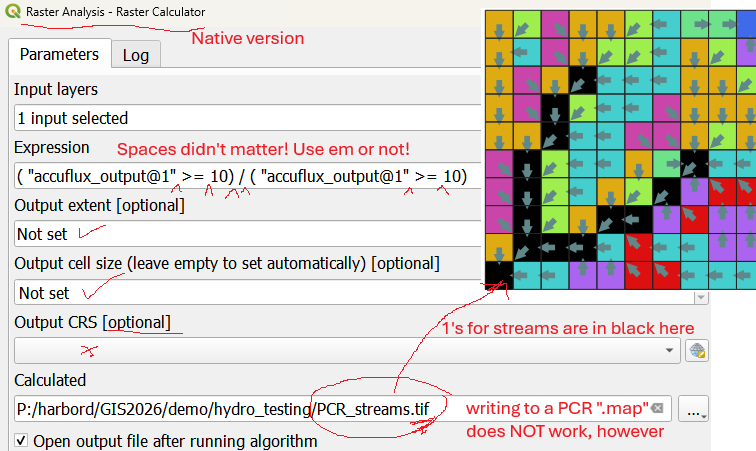
I went back to the lab after class, brought up my project (without backing up or retrieving my profile), and reran that command that didn’t work to threshold the streams. Works fine! Got no clue why it didn’t when we tried it. Used the native raster calculator, didn’t set any of the other parameters. Maybe I had another “streams” on my layers panel (that throws a fault). Here’s the way it looks on my laptop; I only put in the input layer, the formula, and the output map (as a .tif, using .map does not work).
Fri 2/13/26 (5.3)
-
- Quiz first.
- Delete and RE-copy the folder “hydro” from
R:\courses\EEG_316_GIS_2026\sharedwork\demo
–sorry :/ It had a broken link and missing file. - Why didn’t viewshed for multiple points work on Wednesday? I forgot a step 🙂
For multiple points, we needed to have used a plugin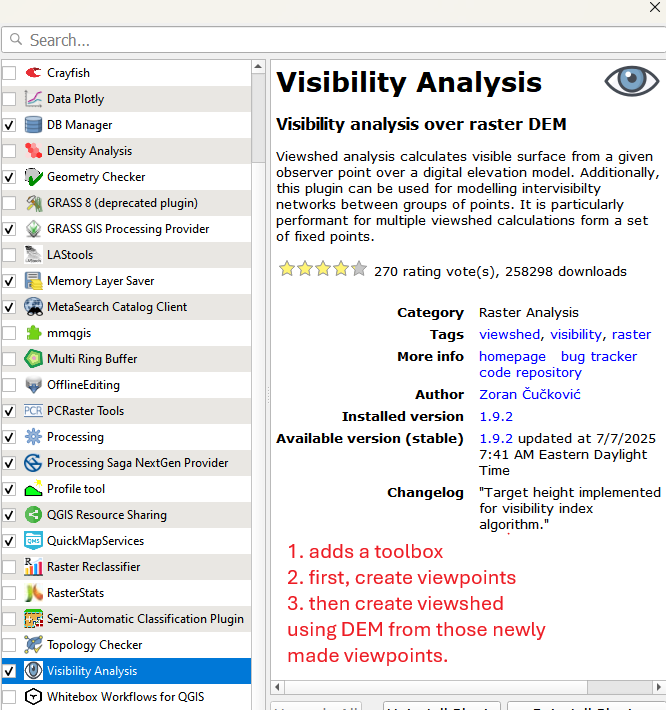
Wed 2/11/26 (5.2)
-
- Copy the folders “topo_view” and “watershed”
(and…..if I get it finished and its there, “hydro”)
from
R:\courses\EEG_316_GIS_2026\sharedwork\demo
to your demo folder. - Open the project “contours_TIN” in demo\topo_intro so we can look a bit more carefully at curvature.
- Copy the folders “topo_view” and “watershed”
Monday 2/9/26 (5.1)
-
- open the Q project DEM_data from your demo\topo_intro folder
Friday 2/5/26 (4.3)
-
- Quiz first
- Copy
- the folder “topo_intro” from
R:\courses\EEG_316_GIS_2026\sharedwork\demo
to your demo folder.
WED 2/3/26 (4.2)
-
-
- If you didn’t do it Monday, copy the folder “inverseQ” from
R:\courses\EEG_316_GIS_2026\sharedwork\demo
to your demo folder. - Open the QGIS project in it.
- If you didn’t do it Monday, copy the folder “inverseQ” from
-
Monday 2/1/26 (4.1) lab – Project 1
-
- read the top of the project page
- Decide on a partner or not
- Make a good workspace (see project description)
- Copy the one file you need from R:
Monday 2/1/26 (4.1) class
-
- Copy the folders “spatial_join” and “inverseQ” from
R:\courses\EEG_316_GIS_2026\sharedwork\demo
to your demo folder. - Open the Overlay_Analysis project again so we can finish that one off first.
- Copy the folders “spatial_join” and “inverseQ” from
Friday 1/30/26
-
- Quiz first
- Then we’ll do some more of the case studies. Randomly ordered.
- Lastly, will get back to raster overlay combinations; reopen your Overlay_Analyses project.
Wednesday 1/28
oops
Monday 1/26
– snow day; no class no lab
Friday 1/23/26
-
- Quiz first
- Then we’ll do half of the case studies. Randomly ordered.
- Lastly, assuming we have time, we’ll reopen our Overlay_Analyses project.
- Lab exercises on their way !! soon?
Wednesday 1/21/26
-
- We need to pick a time for the final project presentations for the end of class, so I can reserve the Great Hall for posters.
- Friday afternoon? Note: Dave is likely gone to a “Friends of the Pleistocene” field meeting Friday afternoon, but maybe I could fly in the evening….TBD
- Could we use class time Friday plus an hour before or after (how many have classes both sides?)
- Monday of Final’s week 3-5 PM?
- Open the Overlay_Analyses project from your copy of the overlayQ folder
- We need to pick a time for the final project presentations for the end of class, so I can reserve the Great Hall for posters.
Monday 1/19/26
No class MLK day
Friday 1/16/26
-
- Quiz first
Do you have any questions before we start? - Copy the folder “R:\courses\EEG_316_GIS_2026\sharedwork\demo\overlayQ” to your copy of the ..\demo folder .
- Open the Overlay_Analyses project.
- Quiz first
-
- ReHint: next week is MLK week where “Monday is Friday.” No class on Monday and therefore we’ll have “back to back” labs on Friday and Monday :/
Wed January 14, 2026
-
- open the “intro_Q_project_the_world.qgz” from your copy of the ..\demo\intro folder.
-
- next week is MLK week where “Monday is Friday.” No class on Monday and therefore we’ll have “back to back” labs on Friday and Monday :/
- Quiz at the start of class Friday will cover the lecture topics through today.
Monday January 12, 2026 (lab)
-
- Copy the folder “R:\courses\EEG_316_GIS_2026\sharedwork\exercises\week1_ex1”
- Open to Exercise 1 on page 19 of Menke
- Following the instructions given on the “Exercises” page of this website as you work through the Menke Exercises (these are you “breadcrumbs”)
Monday January 12, 2026 (class)
-
- Open from your copy of the introQ folder
- intro_Q-SpatialData.qgz, but don’t do anything about the missing data box…..I want to show you the fix (also in how-to’s folder on R:\courses).
- the lecture notes page 1.5 “3 types of data”
- Open from your copy of the introQ folder
Friday January 9, 2026
- Important info:
- You will need to learn to keep files in an organized way. I recommend using \\geodata for everything. Box does not work well with GIS because of the file latency. If you’re planning to work on your own laptop, I recommend putting your GIS work in a folder at the root level (C:\GIS\…)
- DO NOT accept the default location for saving files–it is likely the C:\users\…..\documents folder, one that will die when you log off from a lab frozen lab computer.
- Setup:
In your folder on \\geodata\vol0 (mapped to P:) or your C: drive, create a master “GIS” folder with the following folders within it:- demo – for you to work on during class periods/lectures
- exercises – for tutorial and exercise work o your own
- projects – for open-ended assignments
- downloads – for temporary storage of GIS data downloaded from the we
NO SPACES in file names or folder names – EVER!
- copy the first demo folder called “introQ” from the shared work folder for this class on R:\courses\EEG_316_GIS_2026
You can access QGIS from the lab computers or your own laptop. Q supports any operating system. If you’re setting up Q on your laptop, I will recommend that you use the same version that is in the lab (3.40.13). More help next week in lab if you’d like to get yours set up like the lab computers. The script “R:\courses\EEG_316_GIS_2026\mapStudentGeoDrives.bat”
will map the geodata drives on your laptop so you can use those same letter designations when on campus or using the VPN.
Nick’s note: “For more complex analyses, Q will struggle to run on a laptop.”